
If a man bought a Ferrari but didn’t have a driver’s license, you’d say he’s wasting his money. Imagine if his city didn’t even have paved roads, you’d call him a madman.
Yet, in the cybersecurity world, we see organizations doing the same thing every day. They purchase high-end Security Orchestration, Automation, and Response (SOAR) platforms or the latest AI agents, expecting instant magic.
The harsh truth? The tool is not the solution. If you try to automate a broken process, you don’t achieve efficiency; you just execute broken results at machine speed. Welcome to Part 1 of my series on Enterprise SOC Automation. Today, we are breaking down exactly why automation initiatives fail and providing the ultimate blueprint to build your plan from the ground up.
1. Plan Before You Purchase
The number one reason SOC automation projects fail is the lack of foundational planning. Security leaders often buy a tool to fix a “people and process” problem.
Before you even look at a vendor’s pricing sheet or write a single line of Python, you must establish a baseline. You need to answer three critical questions:
- What are our primary objectives? (e.g., reducing alert fatigue, speeding up containment).
- What is our environment’s readiness? (Do we have clean data? Are our Standard Operating Procedures documented?)
- What is the exact problem we are trying to solve? Without a plan, your automation will devolve into a brittle web of scripts. With a plan, automation becomes a force multiplier that saves your analysts from burnout.
2. Setting the Right Automation Objectives
When building your automation charter, you need clearly defined targets. You shouldn’t aim to automate 100% of everything, some tasks absolutely require human intuition.
Based on enterprise best practices, here is what a mature automation coverage map should look like:
- Centralized Incident Management
- Reporting Activities
- Overseeing SOC Operation Utilization & Performance
- Level 1 (L1) Activities
- Level 2 (L2) Activities
- Threat Hunting Activities
- Response Activities
- MTTA and MTTR
3. Assess Your Current Situation: What Level of Automation Do You Have?
Before you can build a roadmap to your destination, you must honestly assess your current standing. Look at the SOC Automation Maturity chart below. Most organizations think they are at a Level 3, but in reality, they are barely at a Level 1.
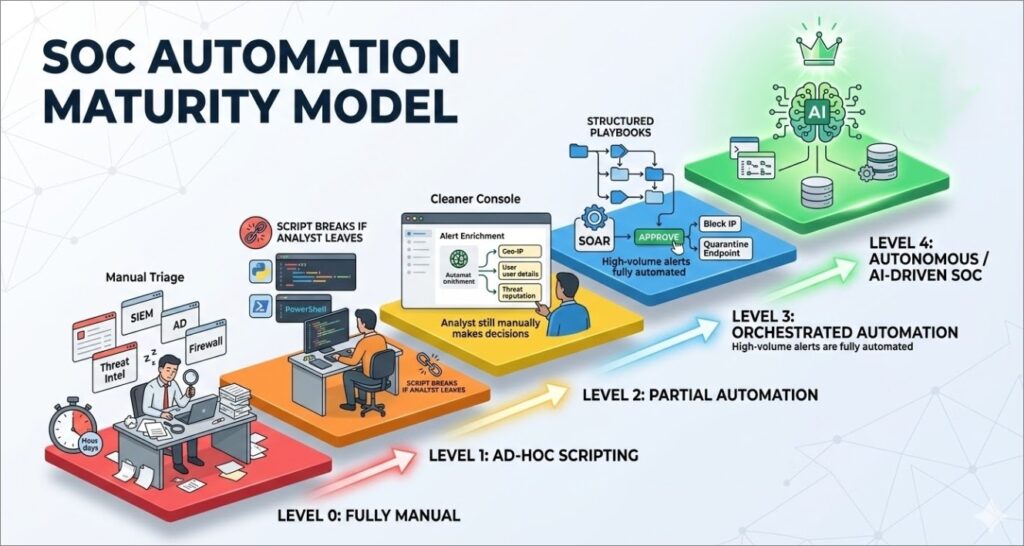
To understand the chart, here is a breakdown of the typical automation maturity levels:
- Level 0: Fully Manual Every alert is triaged by hand. Analysts manually pivot between the SIEM, Threat Intel feeds (like VirusTotal), Active Directory, and firewalls. Context-switching is at an all-time high, and MTTR is measured in hours or days.
- Level 1: Ad-Hoc Scripting Analysts have started writing their own Python or PowerShell scripts to automate repetitive tasks. While this saves time, there is no centralized control, no version tracking, and when the analyst who wrote the script leaves the company, the automation breaks.
- Level 2: Partial Automation The SOC has deployed a platform to handle basic tasks, primarily focused on alert enrichment. When an alert fires, the system automatically gathers the context (IP reputation, user details) and presents it to the analyst. However, decision-making and response are still 100% manual.
- Level 3: Orchestrated Automation This is where a true SOAR platform shines. Standard Operating Procedures (SOPs) are converted into structured playbooks. High-volume, low-complexity alerts (like phishing) are fully automated from detection to triage, while response actions (like blocking an IP) require a single “click-to-approve” from an analyst.
- Level 4: Autonomous / AI-Driven SOC: The holy grail of SecOps. At this level, Agentic AI and advanced machine learning models handle complex correlations. The system dynamically generates workflows, conditionally auto-closes false positives, and continuously learns from analyst behavior to improve future response accuracy.
Knowing your current level is critical. You cannot jump from Level 0 to Level 4 by simply buying a tool. You must progress through the phases methodically.
4. The Automation Phases: From Scratch to Fully Automated
You cannot automate a SOC overnight. Attempting to build complex response playbooks on day one will lead to catastrophic false positives (like accidentally isolating your CEO’s laptop). A successful rollout follows a strict, 5-phase approach:
Phase 1: Foundational Automation
This phase focuses on building enrichment and triage playbooks for high-volume alert categories to reduce analyst workload.
Objectives:
- Integrate all alert sources with SOAR
- Alert normalization and deduplication
- Mapping to MITRE ATT&CK
- Build the main playbook for each alert source
- Fetch alarm-related events
- CTI enrichment
- Related detection rules
- Cover the top 10 categories by automated analysis
Phase 2: Basic Automation
Here, we automate the repetitive, high-volume alerts typically handled by L1 analysts.
- Focus Areas: The top 10 L1 use cases (e.g., failed login brute-force, suspicious PowerShell, executable from USB, inbound malicious emails).
- Goals: Full automation from detection to triage, conditional auto-closure of false positives, and ITSM ticketing integration.
Phase 3: Reporting and Operations Automation
Stop paying expensive security analysts to copy and paste data into Excel.
- Reporting: Auto-generating and distributing Weekly, Monthly, and Quarterly reports to stakeholders.
- Operational Tasks: Automating employee onboarding (email/VPN creation) and offboarding (disabling access immediately).
Phase 4: Level 2 (L2) Use Case Automation
Shifting to moderate-complexity alerts that require multi-source correlation.
- Focus Areas: Lateral movement detection, beaconing behavior, internal privilege escalation, and rare process execution.
- Goals: Automating multi-source correlation and flagging alerts for analyst review with pre-analyzed evidence.
Phase 5: Response Automation
The final phase involves the selective automation of response actions for validated, high-confidence threats.
- Focus Areas: Blocking IPs on firewalls, quarantining endpoints, and disabling compromised accounts.
- Controls: Human-in-the-loop (mandatory analyst approval), risk-based thresholds, and full rollback capabilities.
5. Process, Procedures, and Communication
If anyone on the team can write a script and push it to production, your SOC will break. You need strict governance to maintain stability, also a cross-team communication matrix and SLA must be enforced.
Below are sample processes for cross-team communication, but each environment should customise and build it’s own process based on the operation and maturity level.
A. New Playbook Requests
- Initiation: A SOC Analyst identifies an operational need and submits a formal request detailing the trigger conditions and expected actions.
- Review & Scoping: The SOC Manager validates the business priority. If approved, the Automation Team Lead translates it into technical specs.
- Development & Deployment: Automation Engineers build the playbook in a staging environment. After strict QA testing, the SOC Manager approves the deployment. The playbook is then heavily monitored for 30 days.
B. Integration Requests When connecting SOAR to external tools (SIEM, EDR, Firewalls), the SIEM Administrator must be involved. They ensure that log source connections, parsing, and normalization are accurate before SOAR ingests the data.
C. Automation Failure Handling When Playbooks eventually fail, APIs change, credentials expire, and networks go down, a process for failure handling should exist, and an SLA between teams should be enforced.
- Detection & Assessment: When a failure is detected, the SOC Manager classifies the severity (Critical, High, Medium, Low).
- Remediation: The Automation Team isolates the faulty component, applies fixes in staging, and pushes the recovery to production.
- RCA: A Root Cause Analysis must be conducted within 5 business days to prevent a recurrence.
D. Threat Detection Use Case Development Alignment: Each detection usecase created should be shared with the automation team to build an automation playbook based on the detection logic.
6. Measuring Success (The KPIs)
How do you know if your new Ferrari is actually winning the race? You need solid KPIs to prove the ROI of your automation program. The following are sample metrics and KPIs that could be customised based on the objectives set at the beginning:
- Incident Response Efficiency (MTTA & MTTR): Target a 50% reduction from your baseline, or ≤ 30 minutes for Critical incidents.
- Automation Coverage: Track the percentage of automated cases across all levels. The target should be ≥ 80% overall coverage.
- SLA Compliance Rate: Ensure ≥ 95% of tickets are resolved within agreed SLAs.
- Quality of Detection (FPR): Maintain a False Positive Rate of ≤ 5%.
- SIEM Replacement Ratio: This is the ultimate test of a good SOAR. Track how often analysts have to pivot back to the SIEM. A target of 85% replacement means your analysts have enough context inside the SOAR to resolve the alert without context-switching.
Final Thoughts
Automation isn’t an IT project; it’s a strategic operational shift. Start with a solid blueprint, map out your phases, enforce strict procedures, and continuously measure your success.

Leave a Reply